Oakley Meta VanguardPrice, Specs & Ray-Ban Meta Compared
Ask about the Oakley Meta Vanguard
Can I get prescription lenses?No, you cannot. No official prescription version of this frame is offered.
How good is the camera?It shoots on a 12MP main camera.
Can it get wet (shower, pool, swimming)?Yes, it survives a shower and a soaking. Its rating is IP67. It holds up for thirty minutes at one metre. Swimming laps and diving need a different rating, and it does not carry one.
What does it cost?It costs $499. That is the list price.
How long does the battery last?It runs 9 hours. That is 36 hours with the extra from the case, and 6 hours of continuous audio or calls.
Do I need a subscription?It is not clear from the official published information. Meta One Premium, $19.99 a month, is a separate paid plan for Meta AI and Meta's apps, and Meta has not said it applies to these glasses.
Does it work with my phone?Yes, it works with an iPhone or an Android phone.
How heavy is it?It weighs 66g.
Will they fit my face?Yes, the nose pads swap for other sizes. More than one pad in the box, so a low or high bridge both work.
Is it built for sport?Yes, it is built for sport. It is designed to stay on through a run or a ride.
Can I take a photo without using my hands?Yes, you can say the word or press the button. A capture button on the frame, and a spoken command when your hands are full.
Does it work without my phone?No, it needs your phone.
What video can it shoot?It shoots 3K at 30fps. That is its highest setting.
How does it connect?It connects over Bluetooth. No official figure is published, so treat it as a best guess.
How big is the battery?The battery is 235 mAh.
What chip is inside?It runs on Snapdragon AR1 Gen 1.
Which AI assistant does it use?It uses Meta AI. The assistant is fixed, so you cannot swap it.
What software does it run?It runs Meta Horizon OS.
Does it do AR?No, it does not do AR. Nothing is drawn over what you see.
Can I get sunglass or clear lenses?It comes as sunglasses. There is no clear-lens version.
Whose frames are they?They are made with EssilorLuxottica and Oakley. More than one frame maker is involved.
How many microphones?It has 5 microphones. They handle calls, voice control and recording.
Can people tell when it is recording?Yes, a light comes on. People around you can see when the camera is running.
Can it translate?Yes, it can translate.
Does it have a screen?No, it has no screen.
Can I hear it without earbuds?Yes, it has open-ear speakers that play out loud.
Can it see and answer questions about what I am looking at?Yes, it can see what you are looking at and answer about it.
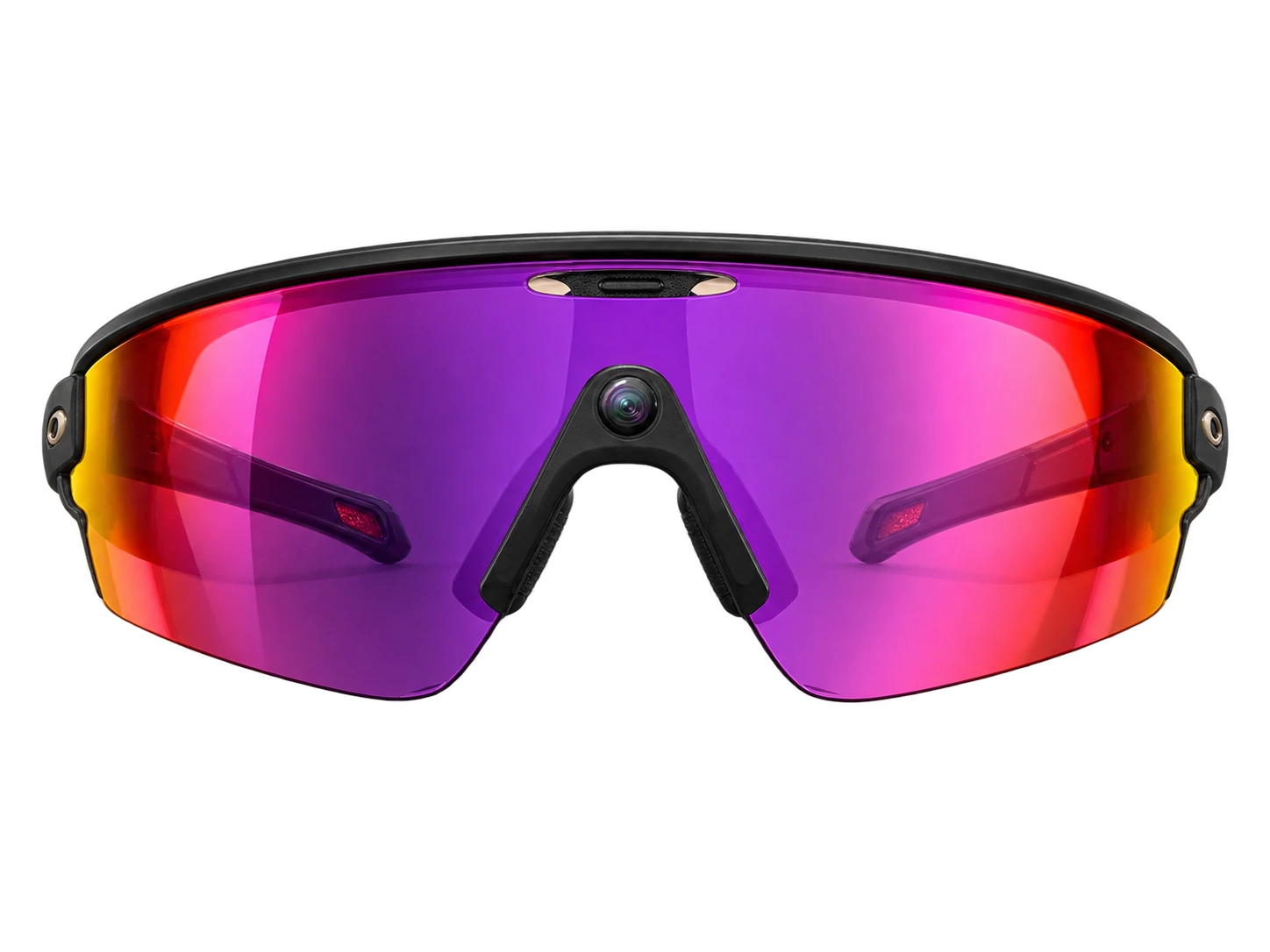
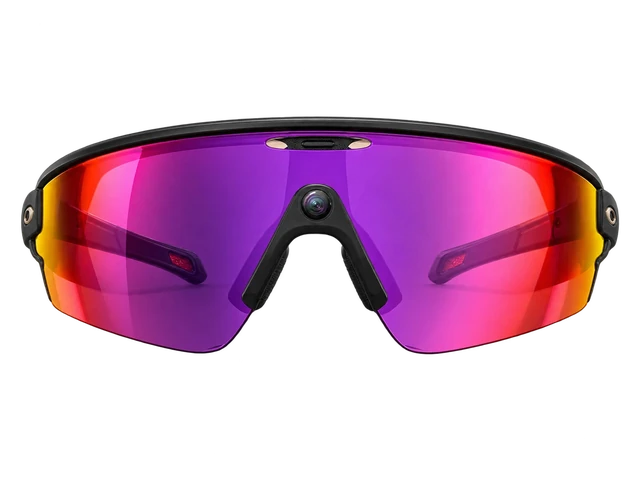
Meta AI glasses in Oakley sport frames. Same camera and AI as Ray-Ban Meta Gen 2, better fit for athletic use. Stealth varies: fine on a trail, obvious at a dinner.
Some pairs woke Meta AI and recorded audio unprompted, even with the wake word off. Meta says that's resolved, so check your voice history in settings and delete anything you didn't ask for.
If you want Meta's glasses without a camera on your face, the $349 Audio pair is lighter on the nose and lasts longer than the camera models. Just don't expect its button to answer calls.
Its frame accommodates cycling helmets, and its open-ear speakers play audio during windy rides.About this sourceSource linkedYou can read the source. We haven't checked its exact wording.The claimCyclingIts frame accommodates cycling helmets, and its open-ear speakers play audio during windy rides.Read the sourceMeta↗
1
Photos and video
2. Photos and video
Centered on the frame, the 12MP camera with a 122-degree lens shoots from your true point of view, with 3K video and punchy colors.About this sourceSource linkedYou can read the source. We haven't checked its exact wording.The claimPhotos and videoCentered on the frame, the 12MP camera with a 122-degree lens shoots from your true point of view, with 3K video and punchy colors.Read the sourceMeta↗
2
Music
3. Music
Up to six hours of continuous music plays through open-ear speakers that stay clear and loud on the road and trail.About this sourceSource linkedYou can read the source. We haven't checked its exact wording.The claimMusicUp to six hours of continuous music plays through open-ear speakers that stay clear and loud on the road and trail.Read the sourceMeta↗
Works with iPhone and Android phones through the Meta AI app.
iPhoneWorks
Do Oakley Meta Vanguard glasses work with iPhone?
Works
Works with a supported iPhone and the Meta AI app.About this sourceSource linkedYou can read the source. We haven't checked its exact wording.The claimiPhoneWorks with a supported iPhone and the Meta AI app.Read the sourceApple App Store / Meta Platforms, Inc.↗Other sourcesOakley↗Oakley / Meta↗Checked Sep 21, 2026
The current US App Store listing requires iOS 17.2 or later. Oakley still lists iOS 14.4 as its minimum, but the required Meta AI app now has the stricter iOS requirement.
Do Oakley Meta Vanguard glasses work with a USB-C iPhone as a video display?
Doesn't work
They cannot show video from a USB-C iPhone.About this sourceSource linkedYou can read the source. We haven't checked its exact wording.The claimUSB-C iPhone (video)They cannot show video from a USB-C iPhone.Read the sourceMeta↗Checked Sep 21, 2026
Meta lists Vanguard as having no display, so no video adapter can turn it into an external screen. This answer is about video only. The glasses can still pair with an iPhone through the Meta AI app for supported phone features.
Android phoneWorks
Do Oakley Meta Vanguard glasses work with Android phones?
Works
Works with Android 10 or later on a supported phone.About this sourceSource linkedYou can read the source. We haven't checked its exact wording.The claimAndroidWorks with Android 10 or later on a supported phone.Read the sourceGoogle Play / Meta Platforms, Inc.↗Other sourcesOakley↗Checked Sep 21, 2026
You need the Meta AI app to manage the glasses, share media, use Meta AI and access supported integrations. Oakley lists Android 10 as the minimum. Google Play did not show a separate store-level Android minimum in the fetched listing.
Do Oakley Meta Vanguard glasses work with an Android phone as a video display?
Doesn't work
They cannot show video from an Android phone.About this sourceSource linkedYou can read the source. We haven't checked its exact wording.The claimAndroid phone (video)They cannot show video from an Android phone.Read the sourceMeta↗Checked Sep 21, 2026
Meta lists Vanguard as having no display, so it cannot act as an external screen and no adapter changes that. This answer is about video only. Bluetooth and app-based phone features are separate from video display support.
MacSome features missing
Do Oakley Meta Vanguard glasses work with a Mac for Bluetooth audio?
Some features missing
For sound, calls and meetings only.About this sourceSource linkedYou can read the source. We haven't checked its exact wording.The claimBluetooth audio with MacFor sound, calls and meetings only.Read the sourceMeta↗Checked Sep 21, 2026
Hold the capture button for 5 seconds with the arms folded to enter pairing mode, then connect in the Mac's Bluetooth settings. Meta AI, the camera and photo import still need the phone app.
Audio only. Meta AI, camera and media import still need the phone app. Meta's page does not name macOS or this model specifically.
Do Oakley Meta Vanguard glasses work with a Mac as a video display?
Doesn't work
They cannot show video from a Mac.About this sourceSource linkedYou can read the source. We haven't checked its exact wording.The claimMac (video)They cannot show video from a Mac.Read the sourceMeta↗Checked Sep 21, 2026
Meta lists Vanguard as having no display, so it cannot act as an external monitor and no adapter changes that. This answer is about video only. Bluetooth audio with a Mac is covered separately.
Windows PCSome features missing
Do Oakley Meta Vanguard glasses work with a Windows PC for Bluetooth audio?
Some features missing
For sound only.About this sourceSource linkedYou can read the source. We haven't checked its exact wording.The claimBluetooth audio with Windows PCFor sound only.Read the sourceMeta↗Checked Sep 21, 2026
You can play audio and take calls and meetings. Meta AI, the camera and media import still need the phone app. Put the glasses in pairing mode, then pick them in Windows Bluetooth settings.
Audio only. Meta AI, camera and media import still need the phone app. Meta's page does not name Windows or this model specifically.
Do Oakley Meta Vanguard glasses work with a Windows PC as a video display?
Doesn't work
They cannot show video from a Windows PC.About this sourceSource linkedYou can read the source. We haven't checked its exact wording.The claimWindows PC (video)They cannot show video from a Windows PC.Read the sourceMeta↗Checked Sep 21, 2026
Meta lists Vanguard as having no display, so it cannot act as an external monitor and no adapter changes that. This answer is about video only. Bluetooth audio with Windows is covered separately.
Get Oakley Meta Vanguard updates
Email me when there's news.
Works with
Does it work with…?
Do Oakley Meta Vanguard glasses work with iPhone?
Works
Works with a supported iPhone and the Meta AI app.About this sourceSource linkedYou can read the source. We haven't checked its exact wording.The claimiPhoneWorks with a supported iPhone and the Meta AI app.Read the sourceApple App Store / Meta Platforms, Inc.↗Other sourcesOakley↗Oakley / Meta↗Checked Sep 21, 2026
The current US App Store listing requires iOS 17.2 or later. Oakley still lists iOS 14.4 as its minimum, but the required Meta AI app now has the stricter iOS requirement.
Which iPhones do Oakley Meta Vanguard glasses work with?
WorksWorked out from the official minimum
They work with every iPhone that runs iOS 17.2 or later, from the iPhone XR on.About this sourceSource linkedYou can read the source. We haven't checked its exact wording.The claimWhich iPhonesThey work with every iPhone that runs iOS 17.2 or later, from the iPhone XR on.Read the sourceApple App Store / Meta Platforms, Inc.↗Other sourcesOakley↗Oakley / Meta↗Apple↗Apple↗Apple↗Apple↗Checked Sep 21, 2026
iPhone 18 Pro and iPhone 18 Pro Max: yes, on iOS 17.2 or later
iPhone 17, iPhone 17 Pro, iPhone 17 Pro Max, iPhone Air and iPhone 17e: yes, on iOS 17.2 or later
iPhone 16, iPhone 16 Plus, iPhone 16 Pro, iPhone 16 Pro Max and iPhone 16e: yes, on iOS 17.2 or later
iPhone 15, iPhone 15 Plus, iPhone 15 Pro and iPhone 15 Pro Max: yes, on iOS 17.2 or later
iPhone 14, iPhone 14 Plus, iPhone 14 Pro and iPhone 14 Pro Max: yes, on iOS 17.2 or later
iPhone 13 mini, iPhone 13, iPhone 13 Pro and iPhone 13 Pro Max: yes, on iOS 17.2 or later
iPhone 12 mini, iPhone 12, iPhone 12 Pro and iPhone 12 Pro Max: yes, on iOS 17.2 or later
iPhone 11, iPhone 11 Pro and iPhone 11 Pro Max: yes, on iOS 17.2 or later
iPhone XR, iPhone XS and iPhone XS Max: yes, on iOS 17.2 or later
iPhone SE (2nd generation) and iPhone SE (3rd generation): yes, on iOS 17.2 or later
iPhone 17 Pro: yes, on iOS 17.2 or later
iPhone 17 Pro Max: yes, on iOS 17.2 or later
iPhone Air: yes, on iOS 17.2 or later
Any iPhone not listed: no, it cannot run that iOS version
Worked out from the official minimum ("iOS 17.2 or later") and Apple's list of the iPhones that run it, not a separate test. See the sources.
Do Oakley Meta Vanguard glasses work with Android phones?
Works
Works with Android 10 or later on a supported phone.About this sourceSource linkedYou can read the source. We haven't checked its exact wording.The claimAndroidWorks with Android 10 or later on a supported phone.Read the sourceGoogle Play / Meta Platforms, Inc.↗Other sourcesOakley↗Checked Sep 21, 2026
You need the Meta AI app to manage the glasses, share media, use Meta AI and access supported integrations. Oakley lists Android 10 as the minimum. Google Play did not show a separate store-level Android minimum in the fetched listing.
How do Oakley Meta Vanguard glasses use the Meta AI app?
The Meta AI app manages the glasses and their core connected features.About this sourceSource linkedYou can read the source. We haven't checked its exact wording.The claimCompanion app, account and subscriptionsThe Meta AI app manages the glasses and their core connected features.Read the sourceApple App Store / Meta Platforms, Inc.↗Other sourcesOakley↗Checked Sep 21, 2026
The app handles settings, media sharing, Meta AI and supported integrations. Some connected services may need their own accounts. The product page does not give one complete subscription policy for every third-party service.
Do Oakley Meta Vanguard glasses work with other Meta glasses and accessories?
Some features missing
One app can run them with your other Meta glasses, but Meta's Charging Stand does not fit.About this sourceSource linkedYou can read the source. We haven't checked its exact wording.The claimCross-generation compatibilityOne app can run them with your other Meta glasses, but Meta's Charging Stand does not fit.Read the sourceMeta↗Other sourcesMeta↗Checked Sep 21, 2026
The Meta AI app can manage up to 7 pairs of glasses. Meta's Charging Stand does not work with Vanguard. Charge them in the case that came in the box, since other cases may not fit.
"Not compatible with Meta Ray-Ban Display or Oakley Meta Vanguard" (Charging Stand). Use the case that came with these glasses; no first-party statement that other cases fit.
Do Oakley Meta Vanguard glasses work with a Mac for Bluetooth audio?
Some features missing
For sound, calls and meetings only.About this sourceSource linkedYou can read the source. We haven't checked its exact wording.The claimBluetooth audio with MacFor sound, calls and meetings only.Read the sourceMeta↗Checked Sep 21, 2026
Hold the capture button for 5 seconds with the arms folded to enter pairing mode, then connect in the Mac's Bluetooth settings. Meta AI, the camera and photo import still need the phone app.
Audio only. Meta AI, camera and media import still need the phone app. Meta's page does not name macOS or this model specifically.
Do Oakley Meta Vanguard glasses work with a Windows PC for Bluetooth audio?
Some features missing
For sound only.About this sourceSource linkedYou can read the source. We haven't checked its exact wording.The claimBluetooth audio with Windows PCFor sound only.Read the sourceMeta↗Checked Sep 21, 2026
You can play audio and take calls and meetings. Meta AI, the camera and media import still need the phone app. Put the glasses in pairing mode, then pick them in Windows Bluetooth settings.
Audio only. Meta AI, camera and media import still need the phone app. Meta's page does not name Windows or this model specifically.
Do Oakley Meta Vanguard glasses work with Nintendo Switch for Bluetooth audio?
Some features missing
But only for game audio, with no microphone.About this sourceSource linkedYou can read the source. We haven't checked its exact wording.The claimBluetooth audio with Nintendo SwitchBut only for game audio, with no microphone.Read the sourceMeta↗Other sourcesNintendo↗Checked Sep 21, 2026
Put the glasses in pairing mode, then pair them from the Switch Bluetooth Audio settings. You can't voice chat through the glasses. While Bluetooth audio is on, you can use up to two wireless controllers, and the sound may lag a little.
No Bluetooth microphone, so no voice chat through the glasses; up to two wireless controllers while using Bluetooth audio; possible audio delay. Nintendo does not name these glasses.
Show all 18Show fewer
Do Oakley Meta Vanguard glasses work with PS5 for Bluetooth audio?
Doesn't work
PS5 does not support Bluetooth audio devices directly.About this sourceSource linkedYou can read the source. We haven't checked its exact wording.The claimBluetooth audio with PlayStation 5PS5 does not support Bluetooth audio devices directly.Read the sourceMeta↗Other sourcesSony Interactive Entertainment↗Checked Sep 21, 2026
Sony says Bluetooth audio devices are not compatible with PS5 consoles. These glasses use Bluetooth for audio, and third-party USB transmitters were not validated here.
Do Oakley Meta Vanguard glasses work with a Mac as a video display?
Doesn't work
They cannot show video from a Mac.About this sourceSource linkedYou can read the source. We haven't checked its exact wording.The claimMac (video)They cannot show video from a Mac.Read the sourceMeta↗Checked Sep 21, 2026
Meta lists Vanguard as having no display, so it cannot act as an external monitor and no adapter changes that. This answer is about video only. Bluetooth audio with a Mac is covered separately.
Do Oakley Meta Vanguard glasses work with a Windows PC as a video display?
Doesn't work
They cannot show video from a Windows PC.About this sourceSource linkedYou can read the source. We haven't checked its exact wording.The claimWindows PC (video)They cannot show video from a Windows PC.Read the sourceMeta↗Checked Sep 21, 2026
Meta lists Vanguard as having no display, so it cannot act as an external monitor and no adapter changes that. This answer is about video only. Bluetooth audio with Windows is covered separately.
Do Oakley Meta Vanguard glasses work with a USB-C iPhone as a video display?
Doesn't work
They cannot show video from a USB-C iPhone.About this sourceSource linkedYou can read the source. We haven't checked its exact wording.The claimUSB-C iPhone (video)They cannot show video from a USB-C iPhone.Read the sourceMeta↗Checked Sep 21, 2026
Meta lists Vanguard as having no display, so no video adapter can turn it into an external screen. This answer is about video only. The glasses can still pair with an iPhone through the Meta AI app for supported phone features.
Do Oakley Meta Vanguard glasses work with an Android phone as a video display?
Doesn't work
They cannot show video from an Android phone.About this sourceSource linkedYou can read the source. We haven't checked its exact wording.The claimAndroid phone (video)They cannot show video from an Android phone.Read the sourceMeta↗Checked Sep 21, 2026
Meta lists Vanguard as having no display, so it cannot act as an external screen and no adapter changes that. This answer is about video only. Bluetooth and app-based phone features are separate from video display support.
Do Oakley Meta Vanguard glasses work with handheld PCs as a video display?
Doesn't work
They cannot show video from a Steam Deck, ROG Ally or other handheld PC.About this sourceSource linkedYou can read the source. We haven't checked its exact wording.The claimHandheld PCs (video)They cannot show video from a Steam Deck, ROG Ally or other handheld PC.Read the sourceMeta↗Checked Sep 21, 2026
Meta lists Vanguard as having no display, so it cannot act as an external monitor for a handheld PC and no adapter changes that. This answer is about video only. Bluetooth audio is a separate question.
Do Oakley Meta Vanguard glasses work with PS5 as a video display?
Doesn't work
They cannot show PS5 video.About this sourceSource linkedYou can read the source. We haven't checked its exact wording.The claimPlayStation 5 (video)They cannot show PS5 video.Read the sourceMeta↗Checked Sep 21, 2026
Meta lists Vanguard as having no display, so it cannot act as a screen for a PS5 and no adapter changes that. This answer is about video only. Bluetooth audio support is a separate question.
Do Oakley Meta Vanguard glasses work with Xbox as a video display?
Doesn't work
They cannot show Xbox video.About this sourceSource linkedYou can read the source. We haven't checked its exact wording.The claimXbox (video)They cannot show Xbox video.Read the sourceMeta↗Checked Sep 21, 2026
Meta lists Vanguard as having no display, so it cannot act as a screen for an Xbox and no adapter changes that. This answer is about video only. Bluetooth audio is a separate question.
Do Oakley Meta Vanguard glasses work with Nintendo Switch as a video display?
Doesn't work
They cannot show Nintendo Switch video.About this sourceSource linkedYou can read the source. We haven't checked its exact wording.The claimNintendo Switch (video)They cannot show Nintendo Switch video.Read the sourceMeta↗Checked Sep 21, 2026
Meta lists Vanguard as having no display, so it cannot act as a screen for a Nintendo Switch and no adapter changes that. This answer is about video only. Bluetooth audio support is a separate question.
Do Oakley Meta Vanguard glasses work with Nintendo Switch 2 as a video display?
Doesn't work
They cannot show Nintendo Switch 2 video.About this sourceSource linkedYou can read the source. We haven't checked its exact wording.The claimNintendo Switch 2 (video)They cannot show Nintendo Switch 2 video.Read the sourceMeta↗Checked Sep 21, 2026
Meta lists Vanguard as having no display, so it cannot act as a screen for a Nintendo Switch 2 and no adapter changes that. This answer is about video only. Bluetooth audio is a separate question.
Most paired with
iPhoneWorks
Do Oakley Meta Vanguard glasses work with iPhone?
Works
Works with a supported iPhone and the Meta AI app.About this sourceSource linkedYou can read the source. We haven't checked its exact wording.The claimiPhoneWorks with a supported iPhone and the Meta AI app.Read the sourceApple App Store / Meta Platforms, Inc.↗Other sourcesOakley↗Oakley / Meta↗Checked Sep 21, 2026
The current US App Store listing requires iOS 17.2 or later. Oakley still lists iOS 14.4 as its minimum, but the required Meta AI app now has the stricter iOS requirement.
Do Oakley Meta Vanguard glasses work with a USB-C iPhone as a video display?
Doesn't work
They cannot show video from a USB-C iPhone.About this sourceSource linkedYou can read the source. We haven't checked its exact wording.The claimUSB-C iPhone (video)They cannot show video from a USB-C iPhone.Read the sourceMeta↗Checked Sep 21, 2026
Meta lists Vanguard as having no display, so no video adapter can turn it into an external screen. This answer is about video only. The glasses can still pair with an iPhone through the Meta AI app for supported phone features.
Android phoneWorks
Do Oakley Meta Vanguard glasses work with Android phones?
Works
Works with Android 10 or later on a supported phone.About this sourceSource linkedYou can read the source. We haven't checked its exact wording.The claimAndroidWorks with Android 10 or later on a supported phone.Read the sourceGoogle Play / Meta Platforms, Inc.↗Other sourcesOakley↗Checked Sep 21, 2026
You need the Meta AI app to manage the glasses, share media, use Meta AI and access supported integrations. Oakley lists Android 10 as the minimum. Google Play did not show a separate store-level Android minimum in the fetched listing.
Do Oakley Meta Vanguard glasses work with an Android phone as a video display?
Doesn't work
They cannot show video from an Android phone.About this sourceSource linkedYou can read the source. We haven't checked its exact wording.The claimAndroid phone (video)They cannot show video from an Android phone.Read the sourceMeta↗Checked Sep 21, 2026
Meta lists Vanguard as having no display, so it cannot act as an external screen and no adapter changes that. This answer is about video only. Bluetooth and app-based phone features are separate from video display support.
MacSome features missing
Do Oakley Meta Vanguard glasses work with a Mac for Bluetooth audio?
Some features missing
For sound, calls and meetings only.About this sourceSource linkedYou can read the source. We haven't checked its exact wording.The claimBluetooth audio with MacFor sound, calls and meetings only.Read the sourceMeta↗Checked Sep 21, 2026
Hold the capture button for 5 seconds with the arms folded to enter pairing mode, then connect in the Mac's Bluetooth settings. Meta AI, the camera and photo import still need the phone app.
Audio only. Meta AI, camera and media import still need the phone app. Meta's page does not name macOS or this model specifically.
Do Oakley Meta Vanguard glasses work with a Mac as a video display?
Doesn't work
They cannot show video from a Mac.About this sourceSource linkedYou can read the source. We haven't checked its exact wording.The claimMac (video)They cannot show video from a Mac.Read the sourceMeta↗Checked Sep 21, 2026
Meta lists Vanguard as having no display, so it cannot act as an external monitor and no adapter changes that. This answer is about video only. Bluetooth audio with a Mac is covered separately.
Windows PCSome features missing
Do Oakley Meta Vanguard glasses work with a Windows PC for Bluetooth audio?
Some features missing
For sound only.About this sourceSource linkedYou can read the source. We haven't checked its exact wording.The claimBluetooth audio with Windows PCFor sound only.Read the sourceMeta↗Checked Sep 21, 2026
You can play audio and take calls and meetings. Meta AI, the camera and media import still need the phone app. Put the glasses in pairing mode, then pick them in Windows Bluetooth settings.
Audio only. Meta AI, camera and media import still need the phone app. Meta's page does not name Windows or this model specifically.
Do Oakley Meta Vanguard glasses work with a Windows PC as a video display?
Doesn't work
They cannot show video from a Windows PC.About this sourceSource linkedYou can read the source. We haven't checked its exact wording.The claimWindows PC (video)They cannot show video from a Windows PC.Read the sourceMeta↗Checked Sep 21, 2026
Meta lists Vanguard as having no display, so it cannot act as an external monitor and no adapter changes that. This answer is about video only. Bluetooth audio with Windows is covered separately.
Nintendo SwitchSome features missing
Do Oakley Meta Vanguard glasses work with Nintendo Switch for Bluetooth audio?
Some features missing
But only for game audio, with no microphone.About this sourceSource linkedYou can read the source. We haven't checked its exact wording.The claimBluetooth audio with Nintendo SwitchBut only for game audio, with no microphone.Read the sourceMeta↗Other sourcesNintendo↗Checked Sep 21, 2026
Put the glasses in pairing mode, then pair them from the Switch Bluetooth Audio settings. You can't voice chat through the glasses. While Bluetooth audio is on, you can use up to two wireless controllers, and the sound may lag a little.
No Bluetooth microphone, so no voice chat through the glasses; up to two wireless controllers while using Bluetooth audio; possible audio delay. Nintendo does not name these glasses.
Do Oakley Meta Vanguard glasses work with Nintendo Switch as a video display?
Doesn't work
They cannot show Nintendo Switch video.About this sourceSource linkedYou can read the source. We haven't checked its exact wording.The claimNintendo Switch (video)They cannot show Nintendo Switch video.Read the sourceMeta↗Checked Sep 21, 2026
Meta lists Vanguard as having no display, so it cannot act as a screen for a Nintendo Switch and no adapter changes that. This answer is about video only. Bluetooth audio support is a separate question.
PlayStation 5Doesn't work
Do Oakley Meta Vanguard glasses work with PS5 for Bluetooth audio?
Doesn't work
PS5 does not support Bluetooth audio devices directly.About this sourceSource linkedYou can read the source. We haven't checked its exact wording.The claimBluetooth audio with PlayStation 5PS5 does not support Bluetooth audio devices directly.Read the sourceMeta↗Other sourcesSony Interactive Entertainment↗Checked Sep 21, 2026
Sony says Bluetooth audio devices are not compatible with PS5 consoles. These glasses use Bluetooth for audio, and third-party USB transmitters were not validated here.
Do Oakley Meta Vanguard glasses work with PS5 as a video display?
Doesn't work
They cannot show PS5 video.About this sourceSource linkedYou can read the source. We haven't checked its exact wording.The claimPlayStation 5 (video)They cannot show PS5 video.Read the sourceMeta↗Checked Sep 21, 2026
Meta lists Vanguard as having no display, so it cannot act as a screen for a PS5 and no adapter changes that. This answer is about video only. Bluetooth audio support is a separate question.
Handheld gaming PCDoesn't work
Do Oakley Meta Vanguard glasses work with handheld PCs as a video display?
Doesn't work
They cannot show video from a Steam Deck, ROG Ally or other handheld PC.About this sourceSource linkedYou can read the source. We haven't checked its exact wording.The claimHandheld PCs (video)They cannot show video from a Steam Deck, ROG Ally or other handheld PC.Read the sourceMeta↗Checked Sep 21, 2026
Meta lists Vanguard as having no display, so it cannot act as an external monitor for a handheld PC and no adapter changes that. This answer is about video only. Bluetooth audio is a separate question.
XboxDoesn't work
Do Oakley Meta Vanguard glasses work with Xbox as a video display?
Doesn't work
They cannot show Xbox video.About this sourceSource linkedYou can read the source. We haven't checked its exact wording.The claimXbox (video)They cannot show Xbox video.Read the sourceMeta↗Checked Sep 21, 2026
Meta lists Vanguard as having no display, so it cannot act as a screen for an Xbox and no adapter changes that. This answer is about video only. Bluetooth audio is a separate question.
What you need
An iPhone with iOS 17.2 or later
Do Oakley Meta Vanguard glasses work with iPhone?
Works
Works with a supported iPhone and the Meta AI app.About this sourceSource linkedYou can read the source. We haven't checked its exact wording.The claimiPhoneWorks with a supported iPhone and the Meta AI app.Read the sourceApple App Store / Meta Platforms, Inc.↗Other sourcesOakley↗Oakley / Meta↗Checked Sep 21, 2026
The current US App Store listing requires iOS 17.2 or later. Oakley still lists iOS 14.4 as its minimum, but the required Meta AI app now has the stricter iOS requirement.
The Meta AI app
Do Oakley Meta Vanguard glasses work with iPhone?
Works
Works with a supported iPhone and the Meta AI app.About this sourceSource linkedYou can read the source. We haven't checked its exact wording.The claimiPhoneWorks with a supported iPhone and the Meta AI app.Read the sourceApple App Store / Meta Platforms, Inc.↗Other sourcesOakley↗Oakley / Meta↗Checked Sep 21, 2026
The current US App Store listing requires iOS 17.2 or later. Oakley still lists iOS 14.4 as its minimum, but the required Meta AI app now has the stricter iOS requirement.
An Android phone with Android 10 or later
Do Oakley Meta Vanguard glasses work with Android phones?
Works
Works with Android 10 or later on a supported phone.About this sourceSource linkedYou can read the source. We haven't checked its exact wording.The claimAndroidWorks with Android 10 or later on a supported phone.Read the sourceGoogle Play / Meta Platforms, Inc.↗Other sourcesOakley↗Checked Sep 21, 2026
You need the Meta AI app to manage the glasses, share media, use Meta AI and access supported integrations. Oakley lists Android 10 as the minimum. Google Play did not show a separate store-level Android minimum in the fetched listing.
A Mac
Do Oakley Meta Vanguard glasses work with a Mac for Bluetooth audio?
Some features missing
For sound, calls and meetings only.About this sourceSource linkedYou can read the source. We haven't checked its exact wording.The claimBluetooth audio with MacFor sound, calls and meetings only.Read the sourceMeta↗Checked Sep 21, 2026
Hold the capture button for 5 seconds with the arms folded to enter pairing mode, then connect in the Mac's Bluetooth settings. Meta AI, the camera and photo import still need the phone app.
Audio only. Meta AI, camera and media import still need the phone app. Meta's page does not name macOS or this model specifically.
A Windows PC
Do Oakley Meta Vanguard glasses work with a Windows PC for Bluetooth audio?
Some features missing
For sound only.About this sourceSource linkedYou can read the source. We haven't checked its exact wording.The claimBluetooth audio with Windows PCFor sound only.Read the sourceMeta↗Checked Sep 21, 2026
You can play audio and take calls and meetings. Meta AI, the camera and media import still need the phone app. Put the glasses in pairing mode, then pick them in Windows Bluetooth settings.
Audio only. Meta AI, camera and media import still need the phone app. Meta's page does not name Windows or this model specifically.
Supports
Do Oakley Meta Vanguard glasses support live translation?
Some features missing
Live translation works in six languages, but separate live captions were not verified.About this sourceSource linkedYou can read the source. We haven't checked its exact wording.The claimLive translation / captionsLive translation works in six languages, but separate live captions were not verified.Read the sourceMeta↗Other sourcesOakley↗Checked Sep 21, 2026
Meta lists English, French, German, Italian, Portuguese and Spanish. Translated audio plays through the open-ear speakers, and translated responses can be shared through the Meta AI app. A supported market and language are required.
Current documented language set is limited, and no separate live-caption feature was verified for Vanguard.
Do Oakley Meta Vanguard glasses support an in-lens display?
Doesn't work
There is no display in the lenses.About this sourceSource linkedYou can read the source. We haven't checked its exact wording.The claimDisplay featuresThere is no display in the lenses.Read the sourceMeta↗Checked Sep 21, 2026
There are no visual graphics or screens in the lenses. The glasses instead use open-ear audio, voice control, a camera, a touchpad and a capture button.
Does Meta AI work everywhere on Oakley Meta Vanguard?
Some features missing
Availability depends on the country, language and Meta AI feature.About this sourceSource linkedYou can read the source. We haven't checked its exact wording.The claimAI region / language availabilityAvailability depends on the country, language and Meta AI feature.Read the sourceMeta↗Other sourcesOakley↗Checked Sep 21, 2026
Meta lists Oakley Meta Vanguard in select regions across North America, Europe and Oceania, including the U.S., Canada, most of Western Europe and Australia. Not every AI feature is available in every supported country or language.
Not every AI feature is available in every listed country/language.
Do Oakley Meta Vanguard glasses support accessibility features?
Works
They support hands-free communication, translation, capture and Meta AI help.About this sourceSource linkedYou can read the source. We haven't checked its exact wording.The claimAccessibilityThey support hands-free communication, translation, capture and Meta AI help.Read the sourceMeta Newsroom↗Checked Sep 21, 2026
Meta says the glasses can help with calls, texts, speech translation, photos and video by voice. Meta AI can also describe your surroundings and connect to Be My Eyes volunteers. Availability can vary by market and feature rollout.
How it works
Can you get Oakley Meta Vanguard glasses with prescription lenses?
Order prescription lenses through Oakley's product setup.About this sourceSource linkedYou can read the source. We haven't checked its exact wording.The claimPrescription lensesOrder prescription lenses through Oakley's product setup.Read the sourceMeta↗Other sourcesOakley↗Checked Sep 21, 2026
Oakley offers single-vision and progressive prescription lenses. No numeric prescription range or third-party insert support was verified. Meta.com lists prescription lenses as unavailable for Vanguard, so this is an Oakley-channel option and depends on Oakley eligibility.
No numeric eligible prescription range or third-party insert compatibility was found in the collected first-party text. Meta.com's US compare table says "Rx lenses not available" for Vanguard, so Rx is an Oakley-channel option, not a Meta.com one.
4.0 / 5
Great
Scores published by other outlets, normalized and averaged. iDevice did not test these products for this score.
Bloomberg first reports Meta's athlete-focused Oakley smart glasses
Mark Gurman reported for Bloomberg that Meta was developing Oakley-branded smart glasses aimed at athletes for 2025. The reporting described the project later known as Supernova 2, including an athlete focus and a center-mounted camera concept that foreshadowed Vanguard.About this sourceSource linkedYou can read the source. We haven't checked its exact wording.The claimBloomberg first reports Meta's athlete-focused Oakley smart glassesMark Gurman reported for Bloomberg that Meta was developing Oakley-branded smart glasses aimed at athletes for 2025. The reporting described the project later known as Supernova 2, including an athlete focus and a center-mounted camera concept that foreshadowed Vanguard.Read the sourceBloomberg (via Yahoo Finance)↗Event date Jan 21, 2025
Sep 17, 2025 · Announced
Meta announces Oakley Meta Vanguard for high-intensity sports
Meta formally introduced Oakley Meta Vanguard at Connect as a new line of Performance AI glasses for athletes. It confirmed a centered camera, Garmin and Strava integrations, immersive audio, IP67 resistance, a $499 price and an October 21 launch.About this sourceSource linkedYou can read the source. We haven't checked its exact wording.The claimMeta announces Oakley Meta Vanguard for high-intensity sportsMeta formally introduced Oakley Meta Vanguard at Connect as a new line of Performance AI glasses for athletes. It confirmed a centered camera, Garmin and Strava integrations, immersive audio, IP67 resistance, a $499 price and an October 21 launch.Read the sourceMeta↗Event date Sep 17, 2025
Oct 21, 2025 · Went on sale
Oakley Meta Vanguard goes on sale
A launch-day Oakley press release carried by Shop Eat Surf Outdoor confirmed that Vanguard was available. The October 21 availability matched the date Meta set when it announced the glasses at Connect.About this sourceSource linkedYou can read the source. We haven't checked its exact wording.The claimOakley Meta Vanguard goes on saleA launch-day Oakley press release carried by Shop Eat Surf Outdoor confirmed that Vanguard was available. The October 21 availability matched the date Meta set when it announced the glasses at Connect.Read the sourceOakley press release via Shop Eat Surf Outdoor↗Event date Oct 21, 2025
Dec 16, 2025 · New feature
V21 adds voice shortcuts, Garmin workouts and Spotify vision features
Tom's Guide detailed a Vanguard software update that added hands-free Garmin workout creation, Spotify playlists based on what the glasses see, Conversation Focus and voice shortcuts. The package expanded the glasses' sports and audio utility only weeks after launch.About this sourceSource linkedYou can read the source. We haven't checked its exact wording.The claimV21 adds voice shortcuts, Garmin workouts and Spotify vision featuresTom's Guide detailed a Vanguard software update that added hands-free Garmin workout creation, Spotify playlists based on what the glasses see, Conversation Focus and voice shortcuts. The package expanded the glasses' sports and audio utility only weeks after launch.Read the sourceTom's Guide↗Event date Dec 16, 2025
Feb 3, 2026 · Went on sale
Oakley Meta Vanguard launches in India
Gadgets 360 reported Vanguard's India launch at Rs. 52,300, expanding the product into another market after its original October release. The India version retained Meta AI and the sport-focused wraparound design.About this sourceSource linkedYou can read the source. We haven't checked its exact wording.The claimOakley Meta Vanguard launches in IndiaGadgets 360 reported Vanguard's India launch at Rs. 52,300, expanding the product into another market after its original October release. The India version retained Meta AI and the sport-focused wraparound design.Read the sourceGadgets 360↗Event date Feb 3, 2026
Mar 31, 2026 · Design and hardware
Oakley expands Vanguard colors and introduces Prizm Transitions lenses
Oakley announced new Vanguard colorways and made Prizm Transitions lenses part of the Performance AI glasses lineup. Some new color options became available immediately, while additional Vanguard Transitions variants were scheduled for June.About this sourceSource linkedYou can read the source. We haven't checked its exact wording.The claimOakley expands Vanguard colors and introduces Prizm Transitions lensesOakley announced new Vanguard colorways and made Prizm Transitions lenses part of the Performance AI glasses lineup. Some new color options became available immediately, while additional Vanguard Transitions variants were scheduled for June.Read the sourceOakley↗Event date Mar 31, 2026
At a glance
THIS PRODUCTOakley Meta VanguardCOMPARE WITHMeta Ray-Ban Gen 2
Camera
12MP (122° ultra-wide)Why we say thisConfirmedMeta says this. iDevice checked the exact words on that page.The claimCamera12MP (122° ultra-wide)See the sourceMeta↗Date recorded Jul 12, 2026
12MPWhy we say thisConfirmedRay-Ban (official) says this. iDevice checked the exact words on that page.The claimCamera12MPSee the sourceRay-Ban (official)↗Date recorded Jul 11, 2026
Glasses battery
Up to 9 hrsWhy we say thisConfirmedMeta says this. iDevice checked the exact words on that page.The claimGlasses batteryUp to 9 hrsSee the sourceMeta↗Date recorded Jul 15, 2026
8 hrsWhy we say thisConfirmedMeta says this. iDevice checked the exact words on that page.The claimGlasses battery8 hrsSee the sourceMeta↗Date recorded Jul 15, 2026
Works with
iOS 14.4+ or Android 10+Why we say thisConfirmedNotebookcheck says this. iDevice checked the exact words on that page.The claimWorks withiOS 14.4+ or Android 10+See the sourceNotebookcheck↗Date recorded Jul 13, 2026
iOS & Android
Display
NoWhy we say thisConfirmedMeta (about.fb.com press release) says this. iDevice checked the exact words on that page.The claimDisplayNoSee the sourceMeta (about.fb.com press release)↗Date recorded Jul 13, 2026
NoWhy we say thisConfirmedPCMag says this. iDevice checked the exact words on that page.The claimDisplayNoSee the sourcePCMag↗Date recorded Jul 11, 2026
Price
The starting list price, not a temporary sale price. It is usually the first thing that rules a product in or out.
From $499
From $379
Case battery
Both list the same runtime on the frames, so the charging case is where the endurance difference actually is.
Adds 36 hrs of chargeWhy we say thisConfirmedMeta (about.fb.com press release) says this. iDevice checked the exact words on that page.The claimCase batteryAdds 36 hrs of chargeSee the sourceMeta (about.fb.com press release)↗Date recorded Jul 13, 2026
+48 hrsWhy we say thisConfirmedMeta says this. iDevice checked the exact words on that page.The claimCase battery+48 hrsSee the sourceMeta↗Date recorded Jul 15, 2026
Weight
Weight decides all-day comfort. Exact and approximate figures are shown the way each company states them.
66gWhy we say thisConfirmedMeta says this. iDevice checked the exact words on that page.The claimWeight66gSee the sourceMeta↗Date recorded Jul 15, 2026
~50gWhere this came fromReportedPCMag reported this. It is not officially confirmed.The claimWeight~50gRead the reportPCMag↗Date recorded Jul 11, 2026
Frame styles
Frame shape and size decide whether they suit your face, and it is the hardest thing to change after buying.
4 frame/lens colorwaysWhy we say thisConfirmedMeta Quest Blog says this. iDevice checked the exact words on that page.The claimFrame styles4 frame/lens colorwaysSee the sourceMeta Quest Blog↗Date recorded Jul 13, 2026
Wayfarer, Skyler, Headliner, Blayzer Optics, Scriber OpticsWhere this came fromReportedMeta reported this. It is not officially confirmed.The claimFrame stylesWayfarer, Skyler, Headliner, Blayzer Optics, Scriber OpticsRead the reportMeta↗Date recorded Jul 11, 2026150+ combinations
Prescription range
The supported range decides whether these can be your everyday glasses or only a second pair.
Prescription lenses not supportedWhy we say thisConfirmedMeta says this. iDevice checked the exact words on that page.The claimPrescription rangePrescription lenses not supportedSee the sourceMeta↗Date recorded Oct 23, 2026
-12.00 to +6.00Why we say thisConfirmedMeta says this. iDevice checked the exact words on that page.The claimPrescription range-12.00 to +6.00See the sourceMeta↗Date recorded Jul 12, 2026
Nose pads
Adjustable nose pads decide how securely the frames sit and how they wear over a long day.
Three-Point Fit system with 3 replaceable nose pads (low- and high-bridge fit)Why we say thisConfirmedMeta (about.fb.com press release) says this. iDevice checked the exact words on that page.The claimNose padsThree-Point Fit system with 3 replaceable nose pads (low- and high-bridge fit)See the sourceMeta (about.fb.com press release)↗Date recorded Jul 13, 2026
Fixed (most styles)Why we say thisConfirmedMeta Newsroom says this. iDevice checked the exact words on that page.The claimNose padsFixed (most styles)See the sourceMeta Newsroom↗Date recorded Jul 11, 2026
Show 13 more specs⌄
Auto-tint lenses
Fixed PRIZM (Prizm Transitions option)Why we say thisConfirmedMeta says this. iDevice checked the exact words on that page.The claimAuto-tint lensesFixed PRIZM (Prizm Transitions option)See the sourceMeta↗Date recorded Jul 12, 2026
Transitions lenses (+$80 option)Why we say thisConfirmedMeta (official) says this. iDevice checked the exact words on that page.The claimAuto-tint lensesTransitions lenses (+$80 option)See the sourceMeta (official)↗Date recorded Jul 11, 2026
Video
Camera hardware changes what you can capture and which visual features are possible.
3K at 30fpsWhy we say thisConfirmedMeta says this. iDevice checked the exact words on that page.The claimVideo3K at 30fpsSee the sourceMeta↗Date recorded Jul 12, 2026
3K at 30fpsWhy we say thisConfirmedRay-Ban (official) says this. iDevice checked the exact words on that page.The claimVideo3K at 30fpsSee the sourceRay-Ban (official)↗Date recorded Jul 11, 2026
Connectivity
Bluetooth, Wi-Fi and other connections determine what the device can work with.
Wi-Fi 6Where this came fromReportedNotebookcheck reported this. It is not officially confirmed.The claimConnectivityWi-Fi 6Read the reportNotebookcheck↗Date recorded Jul 13, 2026BLE
Bluetooth 5.3Why we say thisConfirmedMeta (official) says this. iDevice checked the exact words on that page.The claimConnectivityBluetooth 5.3See the sourceMeta (official)↗Date recorded Jul 11, 2026Wi-Fi 6
Frame brands
The eyewear partner decides the styles, the shops and where you get them fitted.
Oakley (EssilorLuxottica)Why we say thisConfirmedMeta Quest Blog says this. iDevice checked the exact words on that page.The claimFrame brandsOakley (EssilorLuxottica)See the sourceMeta Quest Blog↗Date recorded Jul 13, 2026
EssilorLuxottica / Ray-BanWhere this came fromReportedWikipedia reported this. It is not officially confirmed.The claimFrame brandsEssilorLuxottica / Ray-BanRead the reportWikipedia↗Date recorded Jul 11, 2026
Hands-free photos
Capture button + voiceWhere this came fromReportedMeta Newsroom reported this. It is not officially confirmed.The claimHands-free photosCapture button + voiceRead the reportMeta Newsroom↗Date recorded Jul 12, 2026
Capture button + voice ('Hey Meta')Why we say thisConfirmedMeta (official) says this. iDevice checked the exact words on that page.The claimHands-free photosCapture button + voice ('Hey Meta')See the sourceMeta (official)↗Date recorded Jul 11, 2026
Microphones
More microphones is usually how a device picks your voice out of a noisy room.
5-mic arrayWhy we say thisConfirmedMeta Newsroom says this. iDevice checked the exact words on that page.The claimMicrophones5-mic arraySee the sourceMeta Newsroom↗Date recorded Jul 13, 2026
5-mic (standard) / 6-mic (Optics frames)Why we say thisConfirmedUploadVR says this. iDevice checked the exact words on that page.The claimMicrophones5-mic (standard) / 6-mic (Optics frames)See the sourceUploadVR↗Date recorded Jul 13, 2026
Walking directions
Unknown
Audio turn-by-turn walking directions (driving pushed to phone)Why we say thisConfirmedMeta Help (official) says this. iDevice checked the exact words on that page.The claimWalking directionsAudio turn-by-turn walking directions (driving pushed to phone)See the sourceMeta Help (official)↗Date recorded Jul 11, 2026
Open-ear speakers
YesWhy we say thisConfirmedMeta Newsroom says this. iDevice checked the exact words on that page.The claimOpen-ear speakersYesSee the sourceMeta Newsroom↗Date recorded Jul 12, 2026open-ear (loudest yet)
YesWhy we say thisConfirmedMeta Newsroom (about.fb.com) says this. iDevice checked the exact words on that page.The claimOpen-ear speakersYesSee the sourceMeta Newsroom (about.fb.com)↗Date recorded Jul 13, 20262x open-ear speakers
Prescription lenses
For glasses, prescription support can decide whether the product is usable at all.
NoWhy we say thisConfirmedMeta says this. iDevice checked the exact words on that page.The claimPrescription lensesNoSee the sourceMeta↗Date recorded Jul 12, 2026Rx not available
Via LensCrafters & Sunglass HutWhere this came fromReportedLensCrafters reported this. It is not officially confirmed.The claimPrescription lensesVia LensCrafters & Sunglass HutRead the reportLensCrafters↗Date recorded Jul 11, 2026
Ongoing cost
Some products need a membership after you buy the hardware.
OptionalWhy we say thisConfirmedThe Verge says this. iDevice checked the exact words on that page.The claimOngoing costOptionalSee the sourceThe Verge↗Date recorded Jul 12, 2026$19.99/mo
OptionalWhy we say thisConfirmedThe Verge says this. iDevice checked the exact words on that page.The claimOngoing costOptionalSee the sourceThe Verge↗Date recorded Jul 12, 2026$19.99/mo
Live translation
YesWhy we say thisConfirmedMeta Store says this. iDevice checked the exact words on that page.The claimLive translationYesSee the sourceMeta Store↗Date recorded Jul 13, 2026Meta AI live translation
YesWhy we say thisConfirmedMeta Newsroom (about.fb.com) says this. iDevice checked the exact words on that page.The claimLive translationYesSee the sourceMeta Newsroom (about.fb.com)↗Date recorded Jul 13, 2026
Ask what you see
AI features vary from simple voice help to camera-based assistants.
Look and ask Meta AIWhy we say thisConfirmedUploadVR says this. iDevice checked the exact words on that page.The claimAsk what you seeLook and ask Meta AISee the sourceUploadVR↗Date recorded Jul 12, 2026
Look and ask Meta AI about what you seeWhy we say thisConfirmedMeta (official) says this. iDevice checked the exact words on that page.The claimAsk what you seeLook and ask Meta AI about what you seeSee the sourceMeta (official)↗Date recorded Jul 11, 2026
Water resistance
Water resistance matters for workouts, showers, swimming and everyday accidents.
IP67Why we say thisConfirmedMeta Newsroom says this. iDevice checked the exact words on that page.The claimWater resistanceIP67See the sourceMeta Newsroom↗Date recorded Jul 13, 2026
IPX4Why we say thisConfirmedMeta (official) says this. iDevice checked the exact words on that page.The claimWater resistanceIPX4See the sourceMeta (official)↗Date recorded Sep 23, 2026
Technical specs⌄
Processor
The processor affects speed, efficiency and which features the device can support.
Snapdragon AR1 Gen 1Why we say thisConfirmedQualcomm says this. iDevice checked the exact words on that page.The claimProcessorSnapdragon AR1 Gen 1See the sourceQualcomm↗Date recorded Jul 12, 2026
Snapdragon AR1 Gen 1Why we say thisConfirmedQualcomm says this. iDevice checked the exact words on that page.The claimProcessorSnapdragon AR1 Gen 1See the sourceQualcomm↗Date recorded Jul 11, 2026
AI assistant
AI features vary from simple voice help to camera-based assistants.
Meta AIWhy we say thisConfirmedMeta (about.fb.com) says this. iDevice checked the exact words on that page.The claimAI assistantMeta AISee the sourceMeta (about.fb.com)↗Date recorded Jul 14, 2026
Meta AIWhy we say thisConfirmedMeta Newsroom says this. iDevice checked the exact words on that page.The claimAI assistantMeta AISee the sourceMeta Newsroom↗Date recorded Jul 11, 2026
AR display
Display size and type affect what you can see and how the product feels to use.
NoWhy we say thisConfirmedMeta (about.fb.com press release) says this. iDevice checked the exact words on that page.The claimAR displayNoSee the sourceMeta (about.fb.com press release)↗Date recorded Jul 13, 2026
No
Controls
Voice commands via “Hey Meta”Why we say thisConfirmedMeta says this. iDevice checked the exact words on that page.The claimControlsVoice commands via “Hey Meta”See the sourceMeta↗Date recorded Oct 23, 2026
NoWhy we say thisConfirmedPCMag says this. iDevice checked the exact words on that page.The claimControlsNoSee the sourcePCMag↗Date recorded Jul 11, 2026touchpad + voice
Recording light
Capture LEDWhere this came fromReportedMeta Newsroom reported this. It is not officially confirmed.The claimRecording lightCapture LEDRead the reportMeta Newsroom↗Date recorded Jul 12, 2026
Capture LEDWhy we say thisConfirmedMeta (official) says this. iDevice checked the exact words on that page.The claimRecording lightCapture LEDSee the sourceMeta (official)↗Date recorded Jul 11, 2026
Live streaming
NoWhy we say thisConfirmedMeta says this. iDevice checked the exact words on that page.The claimLive streamingNoSee the sourceMeta↗Date recorded Oct 23, 2026
No (Gen 1 onlyWhy we say thisConfirmedMeta (official) says this. iDevice checked the exact words on that page.The claimLive streamingNo (Gen 1 onlySee the sourceMeta (official)↗Date recorded Jul 11, 2026per Meta)
Sunglass lenses
YesWhy we say thisConfirmedMeta (about.fb.com press release) says this. iDevice checked the exact words on that page.The claimSunglass lensesYesSee the sourceMeta (about.fb.com press release)↗Date recorded Jul 13, 2026
YesWhy we say thisConfirmedMeta says this. iDevice checked the exact words on that page.The claimSunglass lensesYesSee the sourceMeta↗Date recorded Jul 15, 2026
Optical lenses
NoWhy we say thisConfirmedMeta says this. iDevice checked the exact words on that page.The claimOptical lensesNoSee the sourceMeta↗Date recorded Jul 12, 2026
YesWhy we say thisConfirmedRay-Ban (official) says this. iDevice checked the exact words on that page.The claimOptical lensesYesSee the sourceRay-Ban (official)↗Date recorded Jul 12, 2026
Made for sports
YesWhy we say thisConfirmedMeta Newsroom says this. iDevice checked the exact words on that page.The claimMade for sportsYesSee the sourceMeta Newsroom↗Date recorded Jul 13, 2026
No
Choose your AI
NoWhy we say thisConfirmedUploadVR says this. iDevice checked the exact words on that page.The claimChoose your AINoSee the sourceUploadVR↗Date recorded Jul 12, 2026locked to Meta AI
NoWhy we say thisConfirmedRay-Ban/Meta (official) says this. iDevice checked the exact words on that page.The claimChoose your AINoSee the sourceRay-Ban/Meta (official)↗Date recorded Jul 12, 2026locked to Meta AI
Software
Software affects apps, updates and how well the device fits your other products.
MetaWhy we say thisConfirmedMeta says this. iDevice checked the exact words on that page.The claimSoftwareMetaSee the sourceMeta↗Date recorded Jul 15, 2026
MetaWhy we say thisConfirmedMeta Newsroom says this. iDevice checked the exact words on that page.The claimSoftwareMetaSee the sourceMeta Newsroom↗Date recorded Jul 11, 2026
Battery size
235mAhWhy we say thisConfirmedMoor Insights says this. iDevice checked the exact words on that page.The claimBattery size235mAhSee the sourceMoor Insights↗Date recorded Jul 12, 2026
Unknown
Camera focus
Unknown
fixed focusWhy we say thisConfirmedarXiv (Meta) says this. iDevice checked the exact words on that page.The claimCamera focusfixed focusSee the sourcearXiv (Meta)↗Date recorded Jul 11, 2026
Phone needed
Some products work on their own while others depend on a companion phone.
YesWhy we say thisConfirmedNotebookcheck says this. iDevice checked the exact words on that page.The claimPhone neededYesSee the sourceNotebookcheck↗Date recorded Jul 13, 2026
YesWhy we say thisConfirmedPCMag says this. iDevice checked the exact words on that page.The claimPhone neededYesSee the sourcePCMag↗Date recorded Jul 11, 2026
Cameras
Camera hardware changes what you can capture and which visual features are possible.
12MPWhy we say thisConfirmedMeta says this. iDevice checked the exact words on that page.The claimCameras12MPSee the sourceMeta↗Date recorded Jul 15, 2026
12MPWhere this came fromReportedTechInsights reported this. It is not officially confirmed.The claimCameras12MPRead the reportTechInsights↗Date recorded Jul 11, 2026
28 sales in the past year. The best was $449.99 in November 2025, 10% off the $499 list price.
Returns and warranty
Returns
30-day returnsAbout this sourceSource linkedYou can read the source. We haven't checked its exact wording.The claim30-day returnsRead the sourceMeta↗· the clock starts the day it arrives
Free return shippingAbout this sourceSource linkedYou can read the source. We haven't checked its exact wording.The claimFree return shippingRead the sourceMeta↗
For a Meta Store return, Meta emails a prepaid return shipping label within 1 to 3 days.
A restocking fee may applyAbout this sourceSource linkedYou can read the source. We haven't checked its exact wording.The claimA restocking fee may applyRead the sourceMeta↗
Only if the item comes back used, damaged, missing parts or not resalable. No amount stated.
Send it back like newAbout this sourceSource linkedYou can read the source. We haven't checked its exact wording.The claimSend it back like newRead the sourceMeta↗
Return it complete, in the original packaging, with proof of purchase. If it comes back used, damaged, missing parts or not resalable, Meta may charge a restocking fee or cut the refund.
How you get your money backAbout this sourceSource linkedYou can read the source. We haven't checked its exact wording.The claimHow you get your money backRead the sourceMeta↗
To your original payment method within 5 to 10 business days after Meta receives an online return (Meta Lab terms).
Warranty
Oakley Meta Vanguard is made by EssilorLuxottica and uses the Oakley Limited Warranty, not Meta's.
The glasses are rated IP67, and Oakley says water resistance may decrease over time with normal wear. The warranty text does not say whether water damage is covered.
Lens scratches are not covered. The Oakley exclusions list damage caused by misuse, abuse, accidents, fire, theft, disappearance and misplacement.
Add Meta Warranty PlusAbout this sourceSource linkedYou can read the source. We haven't checked its exact wording.The claimAdd Meta Warranty PlusRead the sourceMeta↗
Meta Warranty Plus can be added for Oakley Meta only at the time of purchase on meta.com (US).
Oakley repairs, replaces or updates software, and in some cases refunds. Oakley pays return shipping with a prepaid label for warranty assessment.
Personalized items and gift cardsAbout this sourceSource linkedYou can read the source. We haven't checked its exact wording.The claimPersonalized items and gift cardsRead the sourceMeta↗
Items personalized or modified to your instructions, gift cards and eVouchers cannot be returned.
BundlesAbout this sourceSource linkedYou can read the source. We haven't checked its exact wording.The claimBundlesRead the sourceMeta↗
Return only part of a bundle and the bundle discount is taken off the refund.
Meta Lab stores (in person)About this sourceSource linkedYou can read the source. We haven't checked its exact wording.The claimMeta Lab stores (in person)Read the sourceMeta↗
Store purchases: 30 days from the date of purchase. Online purchases cannot be returned in a store; return them by mail or through support.
Trade-inAbout this sourceSource linkedYou can read the source. We haven't checked its exact wording.The claimTrade-inRead the sourceMeta↗
A trade-in is not a return and the traded device cannot be given back.
Other retailersAbout this sourceSource linkedYou can read the source. We haven't checked its exact wording.The claimOther retailersRead the sourceMeta↗
Glasses bought from Ray-Ban, Oakley, LensCrafters or another retailer go back to that retailer.
What's in the box
What comes in the box with the Oakley Meta Vanguard?
Here is what you get when you open it. No USB-C charge cable.
We could only confirm part of what ships.
Oakley Meta Vanguard glasses
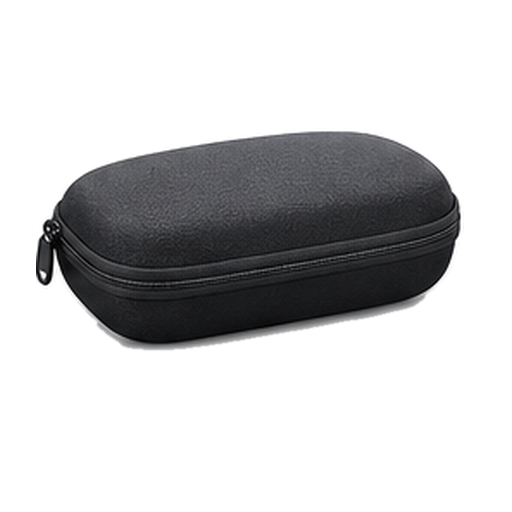
Charging case
Replaceable nose pads
low and high bridge fit · x3
Quick Start Guide
Safety and Warranty Guide
Prescription lens ordering instructions
Not in the box
USB-C charge cableNot in the box
From Oakley and Meta's pages 1, 2. Checked Oct 25, 2026.
No, you cannot. No official prescription version of this frame is offered.
How good is the camera?
It shoots on a 12MP main camera.
What does it cost?
It costs $499. That is the list price.
Do I need a subscription?
It is not clear from the official published information. Meta One Premium, $19.99 a month, is a separate paid plan for Meta AI and Meta's apps, and Meta has not said it applies to these glasses.
Does it work with my phone?
Yes, it works with an iPhone or an Android phone.
How heavy is it?
It weighs 66g.
Is it built for sport?
Yes, it is built for sport. It is designed to stay on through a run or a ride.
Can I take a photo without using my hands?
Yes, you can say the word or press the button. A capture button on the frame, and a spoken command when your hands are full.
Does it work without my phone?
No, it needs your phone.
What video can it shoot?
It shoots 3K at 30fps. That is its highest setting.
How does it connect?
It connects over Bluetooth. No official figure is published, so treat it as a best guess.
What chip is inside?
It runs on Snapdragon AR1 Gen 1.
Which AI assistant does it use?
It uses Meta AI. The assistant is fixed, so you cannot swap it.
What software does it run?
It runs Meta Horizon OS.
Does it do AR?
No, it does not do AR. Nothing is drawn over what you see.
Can I get sunglass or clear lenses?
It comes as sunglasses. There is no clear-lens version.
Whose frames are they?
They are made with EssilorLuxottica and Oakley. More than one frame maker is involved.
How many microphones?
It has 5 microphones. They handle calls, voice control and recording.
Can people tell when it is recording?
Yes, a light comes on. People around you can see when the camera is running.
Can it translate?
Yes, it can translate.
Does it have a screen?
No, it has no screen.
Can I hear it without earbuds?
Yes, it has open-ear speakers that play out loud.
Can it see and answer questions about what I am looking at?
Yes, it can see what you are looking at and answer about it.
Sizing and fit
Will they fit my face?
Yes, the nose pads swap for other sizes. More than one pad in the box, so a low or high bridge both work.
Battery and charging
How long does the battery last?
It runs 9 hours. That is 36 hours with the extra from the case, and 6 hours of continuous audio or calls.
How big is the battery?
The battery is 235 mAh.
Water
Can it get wet (shower, pool, swimming)?
Yes, it survives a shower and a soaking. Its rating is IP67. It holds up for thirty minutes at one metre. Swimming laps and diving need a different rating, and it does not carry one.
Price and models
When did the Oakley Meta Vanguard come out?
It went on sale October 21, 2025. Announced September 17, 2025.
Is there a newer one?
No. The Oakley Meta Vanguard is the current model.
How much does the Oakley Meta Vanguard cost?
List price: $499. Current price we last read at Best Buy: $499, October 31, 2026.
Returns and warranty
How long do I have to return it?
30-day returns The clock starts the day it arrives.About this sourceSource linkedYou can read the source. We haven't checked its exact wording.The claimHow long do I have to return it?30-day returns The clock starts the day it arrives.Read the sourceMeta↗
Is there a restocking fee?
A restocking fee may apply Only if the item comes back used, damaged, missing parts or not resalable. No amount stated.About this sourceSource linkedYou can read the source. We haven't checked its exact wording.The claimIs there a restocking fee?A restocking fee may apply Only if the item comes back used, damaged, missing parts or not resalable. No amount stated.Read the sourceMeta↗
Who pays return shipping?
Free return shipping For a Meta Store return, Meta emails a prepaid return shipping label within 1 to 3 days.About this sourceSource linkedYou can read the source. We haven't checked its exact wording.The claimWho pays return shipping?Free return shipping For a Meta Store return, Meta emails a prepaid return shipping label within 1 to 3 days.Read the sourceMeta↗
Can I return it if I opened or wore it?
Send it back like new Return it complete, in the original packaging, with proof of purchase. If it comes back used, damaged, missing parts or not resalable, Meta may charge a restocking fee or cut the refund.About this sourceSource linkedYou can read the source. We haven't checked its exact wording.The claimCan I return it if I opened or wore it?Send it back like new Return it complete, in the original packaging, with proof of purchase. If it comes back used, damaged, missing parts or not resalable, Meta may charge a restocking fee or cut the refund.Read the sourceMeta↗
How do I get my money back?
How you get your money back To your original payment method within 5 to 10 business days after Meta receives an online return (Meta Lab terms).About this sourceSource linkedYou can read the source. We haven't checked its exact wording.The claimHow do I get my money back?How you get your money back To your original payment method within 5 to 10 business days after Meta receives an online return (Meta Lab terms).Read the sourceMeta↗
How long is the warranty?
1-year warranty Oakley Meta Vanguard is made by EssilorLuxottica and uses the Oakley Limited Warranty, not Meta's.About this sourceSource linkedYou can read the source. We haven't checked its exact wording.The claimHow long is the warranty?1-year warranty Oakley Meta Vanguard is made by EssilorLuxottica and uses the Oakley Limited Warranty, not Meta's.Read the sourceOakley (Luxottica Group S.p.A. on behalf of Oakley Inc)↗
Is there a paid protection plan?
Add Meta Warranty Plus Meta Warranty Plus can be added for Oakley Meta only at the time of purchase on meta.com (US).About this sourceSource linkedYou can read the source. We haven't checked its exact wording.The claimIs there a paid protection plan?Add Meta Warranty Plus Meta Warranty Plus can be added for Oakley Meta only at the time of purchase on meta.com (US).Read the sourceMeta↗
Is water damage covered?
Water resistance wears off The glasses are rated IP67, and Oakley says water resistance may decrease over time with normal wear. The warranty text does not say whether water damage is covered.About this sourceSource linkedYou can read the source. We haven't checked its exact wording.The claimIs water damage covered?Water resistance wears off The glasses are rated IP67, and Oakley says water resistance may decrease over time with normal wear. The warranty text does not say whether water damage is covered.Read the sourceOakley (Luxottica Group S.p.A. on behalf of Oakley Inc)↗
Is the battery covered?
Battery rules: not stated by MetaAbout this sourceSource linkedYou can read the source. We haven't checked its exact wording.The claimIs the battery covered?Battery rules: not stated by MetaRead the sourceMeta↗
In the box
What's in the box?
Charging case, Replaceable nose pads, Quick Start Guide, Safety and Warranty Guide, Prescription lens ordering instructions, Not included: USB-C charge cable.About this sourceSource linkedYou can read the source. We haven't checked its exact wording.The claimWhat's in the box?Charging case, Replaceable nose pads, Quick Start Guide, Safety and Warranty Guide, Prescription lens ordering instructions, Not included: USB-C charge cable.Read the sourceOakley↗
Works with
Do Oakley Meta Vanguard glasses support an in-lens display?
There is no display in the lenses. Doesn't workAbout this sourceSource linkedYou can read the source. We haven't checked its exact wording.The claimDo Oakley Meta Vanguard glasses support an in-lens display?There is no display in the lenses. Doesn't workRead the sourceMeta↗
Does Meta AI work everywhere on Oakley Meta Vanguard?
Availability depends on the country, language and Meta AI feature. Some features missingAbout this sourceSource linkedYou can read the source. We haven't checked its exact wording.The claimDoes Meta AI work everywhere on Oakley Meta Vanguard?Availability depends on the country, language and Meta AI feature. Some features missingRead the sourceMeta↗
Do Oakley Meta Vanguard glasses support accessibility features?
They support hands-free communication, translation, capture and Meta AI help. WorksAbout this sourceSource linkedYou can read the source. We haven't checked its exact wording.The claimDo Oakley Meta Vanguard glasses support accessibility features?They support hands-free communication, translation, capture and Meta AI help. WorksRead the sourceMeta Newsroom↗
Do Oakley Meta Vanguard glasses work with other Meta glasses and accessories?
Partly: one app can run them with your other Meta glasses, but Meta's Charging Stand does not fit. Some features missingAbout this sourceSource linkedYou can read the source. We haven't checked its exact wording.The claimDo Oakley Meta Vanguard glasses work with other Meta glasses and accessories?Partly: one app can run them with your other Meta glasses, but Meta's Charging Stand does not fit. Some features missingRead the sourceMeta↗
Do Oakley Meta Vanguard glasses work with a Mac for Bluetooth audio?
Yes, for sound, calls and meetings only. Some features missingAbout this sourceSource linkedYou can read the source. We haven't checked its exact wording.The claimDo Oakley Meta Vanguard glasses work with a Mac for Bluetooth audio?Yes, for sound, calls and meetings only. Some features missingRead the sourceMeta↗
Do Oakley Meta Vanguard glasses work with a Windows PC for Bluetooth audio?
Yes, for sound only. Some features missingAbout this sourceSource linkedYou can read the source. We haven't checked its exact wording.The claimDo Oakley Meta Vanguard glasses work with a Windows PC for Bluetooth audio?Yes, for sound only. Some features missingRead the sourceMeta↗
Do Oakley Meta Vanguard glasses work with Nintendo Switch for Bluetooth audio?
Yes, but only for game audio, with no microphone. Some features missingAbout this sourceSource linkedYou can read the source. We haven't checked its exact wording.The claimDo Oakley Meta Vanguard glasses work with Nintendo Switch for Bluetooth audio?Yes, but only for game audio, with no microphone. Some features missingRead the sourceMeta↗
Do Oakley Meta Vanguard glasses work with PS5 for Bluetooth audio?
PS5 does not support Bluetooth audio devices directly. Doesn't workAbout this sourceSource linkedYou can read the source. We haven't checked its exact wording.The claimDo Oakley Meta Vanguard glasses work with PS5 for Bluetooth audio?PS5 does not support Bluetooth audio devices directly. Doesn't workRead the sourceMeta↗
Do Oakley Meta Vanguard glasses work with a Mac as a video display?
They cannot show video from a Mac. Doesn't workAbout this sourceSource linkedYou can read the source. We haven't checked its exact wording.The claimDo Oakley Meta Vanguard glasses work with a Mac as a video display?They cannot show video from a Mac. Doesn't workRead the sourceMeta↗
Do Oakley Meta Vanguard glasses work with a Windows PC as a video display?
They cannot show video from a Windows PC. Doesn't workAbout this sourceSource linkedYou can read the source. We haven't checked its exact wording.The claimDo Oakley Meta Vanguard glasses work with a Windows PC as a video display?They cannot show video from a Windows PC. Doesn't workRead the sourceMeta↗
Do Oakley Meta Vanguard glasses work with a USB-C iPhone as a video display?
They cannot show video from a USB-C iPhone. Doesn't workAbout this sourceSource linkedYou can read the source. We haven't checked its exact wording.The claimDo Oakley Meta Vanguard glasses work with a USB-C iPhone as a video display?They cannot show video from a USB-C iPhone. Doesn't workRead the sourceMeta↗
Do Oakley Meta Vanguard glasses work with an Android phone as a video display?
They cannot show video from an Android phone. Doesn't workAbout this sourceSource linkedYou can read the source. We haven't checked its exact wording.The claimDo Oakley Meta Vanguard glasses work with an Android phone as a video display?They cannot show video from an Android phone. Doesn't workRead the sourceMeta↗
Do Oakley Meta Vanguard glasses work with handheld PCs as a video display?
They cannot show video from a Steam Deck, ROG Ally or other handheld PC. Doesn't workAbout this sourceSource linkedYou can read the source. We haven't checked its exact wording.The claimDo Oakley Meta Vanguard glasses work with handheld PCs as a video display?They cannot show video from a Steam Deck, ROG Ally or other handheld PC. Doesn't workRead the sourceMeta↗
Do Oakley Meta Vanguard glasses work with PS5 as a video display?
They cannot show PS5 video. Doesn't workAbout this sourceSource linkedYou can read the source. We haven't checked its exact wording.The claimDo Oakley Meta Vanguard glasses work with PS5 as a video display?They cannot show PS5 video. Doesn't workRead the sourceMeta↗
Do Oakley Meta Vanguard glasses work with Xbox as a video display?
They cannot show Xbox video. Doesn't workAbout this sourceSource linkedYou can read the source. We haven't checked its exact wording.The claimDo Oakley Meta Vanguard glasses work with Xbox as a video display?They cannot show Xbox video. Doesn't workRead the sourceMeta↗
Do Oakley Meta Vanguard glasses work with Nintendo Switch as a video display?
They cannot show Nintendo Switch video. Doesn't workAbout this sourceSource linkedYou can read the source. We haven't checked its exact wording.The claimDo Oakley Meta Vanguard glasses work with Nintendo Switch as a video display?They cannot show Nintendo Switch video. Doesn't workRead the sourceMeta↗
Do Oakley Meta Vanguard glasses work with Nintendo Switch 2 as a video display?
They cannot show Nintendo Switch 2 video. Doesn't workAbout this sourceSource linkedYou can read the source. We haven't checked its exact wording.The claimDo Oakley Meta Vanguard glasses work with Nintendo Switch 2 as a video display?They cannot show Nintendo Switch 2 video. Doesn't workRead the sourceMeta↗