



























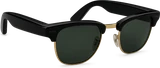



























Android XR glasses will answer to "Hey Gemini" and can switch on their own camera when you ask about something in front of you, according to strings Android Authority found in the latest version of the Google app. Google hasn't announced either feature.
The wake word is the smaller change. Settings text in the app says "Hey Gemini" starts a Live conversation once the glasses are on, and that "Hey Google" and "OK Google" still work alongside it. It isn't on by default. You turn it on from Glasses preferences, and only with wear detection switched on, so the glasses know they are on your face before they start listening.
There's a sensible touch for anyone who owns an Android phone too. When you're wearing the glasses, they take priority over the phone, so saying "Hey Gemini" shouldn't wake both at once. Google's own text also warns that a noise that sounds like the phrase could set Gemini off by accident, which is the trade every always-listening device makes.
The camera part matters more. The strings describe Gemini turning the camera on by itself when it decides you're asking a visual question, with "What kind of plant am I looking at?" as the example. That is the thing people actually want from glasses with a camera and an assistant: ask about what you see, without reaching up to press a button first.
It also raises the obvious worry about a camera that decides for itself when to look. The setup screens the app describes handle that head on. One says Gemini "can activate the camera automatically" and that you can turn this off any time in settings. Without automatic activation, you can still double-press the camera button or say "turn the camera on" or "turn the camera off." If Gemini turns the camera on when you didn't expect it, another line says you can switch it off by hand.
The strings don't name a particular pair of glasses. They sit in Google's assistant code for Android XR glasses, the platform Samsung's Galaxy Glasses and Xreal's Aura run on, so whatever ships here should reach every pair built on it rather than one brand. Android Authority also expects the "Hey Gemini" phrase to come to phones later.
For anyone weighing a pair of Android XR glasses, the takeaway is simple. Hands-free, camera-aware Gemini looks like the way Google means these glasses to work, and the controls to keep the camera on a short leash are being built in from the start. If an automatic camera is a deal breaker for you, it looks like you'll be able to switch it off and still use the glasses.